
The short answer. If your address can get fixed-line NBN — fibre to the premises or HFC cable — keep it. It is faster, cheaper per month and roughly three times lower latency than Starlink. Starlink wins where the fixed line is the problem: an old copper FTTN connection with no upgrade date, a property the network barely reaches, or a place you need online this week instead of next month.
We install Starlink for a living, so it would be easy to write this the other way. We would rather you read the honest version and call us only if satellite is genuinely the right answer at your address. Every number below comes from the ACCC, nbn or a published price list, checked in September 2026 — no marketing claims from either side.
Key takeaways
- If you can get fibre (FTTP) or cable (HFC), keep it. The NBN beats Starlink on speed, monthly price and latency at those addresses.
- Check your address before anything else. A free fibre upgrade beats both options, and it is ordered through your own provider.
- Starlink’s case in Sydney is narrow but real: the copper FTTN pocket around Cronulla, Kurnell, Bundeena and Maianbar, where fibre is still years away.
- The trade is latency and weather. Starlink measured 199 Mbps in the evening against about 88 Mbps on an FTTN 100 plan, but at 30 ms instead of 10 ms, and it loses roughly a third of its speed in heavy rain.
- NBN Fixed Wireless does not exist anywhere in southern or eastern Sydney, so most comparison articles you will read were written for someone else.
Starlink and NBN are not the same kind of thing
Starlink is a satellite internet service run by SpaceX from a constellation in low earth orbit, a few hundred kilometres up rather than the 36,000 km of traditional satellite internet. That short hop is why it behaves nothing like the satellite internet people remember. You get a dish, you give it a clear view of the sky, and you are online. No line to the street, no network build, no waiting for an appointment.
The NBN is not one product. It is the national broadband network, built and run by NBN Co and sold to you by a retail provider, and it is delivered to your address by whichever technology was rolled out in your street:
- FTTP — fibre all the way into the house. The best connection available in Australia.
- HFC — the old pay-TV cable. In practice almost as good as fibre.
- FTTC — fibre to a pit at the kerb, then a short copper run.
- FTTN — fibre to a node on the street corner, then copper the rest of the way. The weak one.
- NBN Fixed Wireless — a small antenna on your roof pointed at a tower on a wireless network built for rural and regional areas.
- Sky Muster — satellite NBN, for addresses the network cannot reach any other way.
So “is Starlink better than NBN” has no single answer. It depends entirely on which of those six you can actually get.
Starlink vs NBN at a glance
| Starlink Residential | Fixed-line NBN (FTTP / HFC) | |
|---|---|---|
| Monthly | $75 for 100 Mbps, $110 for 200 Mbps, $150 unlimited Max | $93–$113 for the 500/50 plan |
| Upfront | $0 for the kit, $19 at checkout, kit returned if you cancel | $0 connection with most providers |
| Typical real speed | 230 Mbps off-peak, 199 Mbps in the evening | 100.8% of the plan speed in the busy hour |
| Latency | 30–36 ms | 9–11 ms |
| In heavy rain | Drops by roughly a third | Unaffected |
| In a blackout | Dead — the dish draws 75–100 W | Dead as well, unless you have battery backup |
| Static IP, port forwarding | No | Yes, about $5 a month |
| Time to connect | Days | Two to four weeks |
| Contract | None, 30-day refund | Usually none, modem cost if you leave early |
Sources: starlink.com/au and provider price lists, ACCC Measuring Broadband Australia report 33 (March 2026 data), all checked 16 September 2026.
First, find out what NBN connection your address can actually get
Everything else is theory until you know your connection type. Put your address into the nbn address checker at nbnco.com.au/check-address. It will tell you the technology at your property and whether an upgrade is available.
If it says FTTP or HFC — you already have the best connection on offer. Stay on it. Read the rest of this article for curiosity, not for a decision.
If it says FTTC or FTTN — check the upgrade line carefully. nbn is replacing copper with fibre at no build cost to you, ordered through your provider. Since 1 July 2026 there is no minimum speed tier on the FTTC upgrade, which opened it to around 860,000 premises. On FTTN and FTTB you still need to take a 500/50 plan or faster to qualify. In September 2026 nbn said more than 99% of the roughly 600,000 remaining FTTN premises will be able to get fibre by December 2030.
A free fibre upgrade beats Starlink on every measure: faster internet access, a cheaper NBN plan for the speed, and nothing on your roof. If your address is eligible, take it and stop reading.
FTTP, HFC or copper: what that means across southern and eastern Sydney
Our service area is unusual, and the usual “Starlink vs NBN” article does not describe it at all. Checking nbn’s own address data across the suburbs we work in:
- There is no fixed wireless NBN anywhere in southern or eastern Sydney. Every article comparing Starlink with fixed wireless is written for someone else.
- HFC cable runs through Bankstown, Hurstville, Randwick, Maroubra and Menai.
- Fibre and FTTC cover Peakhurst, Revesby, Sutherland and Miranda.
- The copper pocket is in the south — Cronulla, Kurnell, Bundeena and Maianbar are on FTTN. Some of those addresses can already order the free fibre upgrade. The rest are in design, with Cronulla targeted for December 2027 and Otford for December 2028.
- Satellite NBN exists locally only at Royal National Park, Darkes Forest, Woronora Dam and Lucas Heights, where almost nobody lives.
So in this part of Sydney the honest version of the question is narrow: if you are on FTTN and the fibre upgrade is still years away, is Starlink worth it in the meantime? For most other addresses here, it is not a close call.
Starlink vs fixed-line NBN: nbn fibre wins, clearly

The ACCC measured real connections in real Australian homes under its Measuring Broadband Australia programme, which closed in mid-2026. In its final report, using March 2026 data, FTTP delivered 100.8% of the advertised plan speed during the busy evening hours and HFC delivered 99.2%. Those connections are not slowing down when everyone gets home.
Then there is the price. The September 2025 speed upgrade moved the family tier to 500/50 for $93–$113 a month, which is what an NBN 100 plan used to cost. Starlink’s 200 Mbps plan is $110. Same money, less than half the speed, and the fibre plan holds its speed in the evening.
Latency is the other gap. Australian fixed broadband sits at a median of 9 ms, and fixed-line NBN at about 10.7 ms in ACCC testing. Starlink measures 29.8 ms in ACCC testing and 36 ms in Ookla’s. That is a genuinely good result for satellite — it is still three to four times a fibre connection.
Verdict: if you can get FTTP or HFC, there is no argument. Keep the fixed line.
Starlink vs FTTN: the comparison that is actually close

This is the comparison that matters in Cronulla, Kurnell and Bundeena, and in every other pocket of Australia still on copper.
FTTN looks fine as a percentage — 94.7% of plan speed in the busy hour — but the percentage hides the ceiling. Copper cannot carry more than an NBN 100 plan, and on that plan the ACCC measured FTTN at 88.2 Mbps against 104.4 Mbps for fibre and cable. Worse, 10.7% of FTTN services underperform, and FTTN accounts for 86% of every underperforming connection in the country. If your evening speeds collapse and your provider keeps telling you the line tests fine, you are in that group.
Starlink in Australian homes measured 230.4 Mbps off-peak and 199.1 Mbps in the busy hour, with uploads around 47 Mbps. That is genuine high-speed internet, and it does not care how far you sit from the node. Against a healthy FTTN line, that is roughly twice the download speed. Against a bad one it is not close.
The trade you make is latency and weather: 30 ms instead of 11 ms, and a real drop in a downpour. For streaming, video calls, working from home and general family use, most people would take that trade over an evening speed of 20 Mbps.
Verdict: check the upgrade first, every time. If fibre is available at no build cost, take the fibre. If your street is scheduled for 2027 or 2028 and your connection is failing you now, Starlink is a genuine answer rather than a consolation prize.
Starlink vs NBN Fixed Wireless and Sky Muster satellite internet
Not a Sydney question, but worth knowing if you have a farm, a holiday house or a business in regional Australia.
NBN Fixed Wireless internet
NBN Fixed Wireless was upgraded in 2024 and now reaches up to 100/20 everywhere in its footprint, with faster tiers where the tower allows. It is decent technology with a documented peak problem: the ACCC measured it at 83.8% of plan in the busy hour against 89.7% across the day, with uploads at only 63.7% of plan and latency around 42 ms. In other words, it sags exactly when your household needs it, and its latency is no better than Starlink’s. The ACCC has also found fixed wireless has fewer dropouts and lower packet loss than Starlink, so neither wins outright.
Sky Muster satellite NBN
Sky Muster, the satellite NBN service for remote areas the network cannot reach any other way, delivered 78.5% of plan in the busy hour. Starlink beats it on speed and latency, and it is not close. Worth knowing: nbn has signed Amazon Leo to replace Sky Muster for around 300,000 regional premises, so Starlink’s low-orbit monopoly in Australia is ending.
What about 5G home internet?
There is a third option people forget, and in metro Sydney it is a real one. 5G home internet puts a modem in your window instead of a dish on your roof, with latency close to a fixed line and no installation at all.
The catch is that it is street-by-street. Coverage depends on which tower you can see and how many neighbours are on it, and providers reserve the right to slow you down when the tower is busy. It is worth a look if you are in the copper pocket and want internet options that do not involve the roof, and it is worth nothing at all if the signal at your address is marginal. Test it before you commit — most 5G home plans are month to month for exactly that reason.
Starlink is the better answer where mobile coverage is poor. 5G is the better answer where the signal is strong and you only need a stopgap until the fibre upgrade arrives.
Cost comparison: what each one really costs in the first year

| First 12 months | |
|---|---|
| Starlink, 100 Mbps | $900 plan + $19 at checkout = $919 |
| Starlink, 200 Mbps | $1,320 plan + $19 at checkout = $1,339 |
| NBN 500 on fibre or cable | about $1,140, connection included |
| NBN 100 on FTTN | about $1,188, connection included |
Two things people miss.
The Starlink dish and router are normally a loan, not a purchase. At Sydney addresses in September 2026 the order page showed no upfront hardware charge and $19 due at checkout, on the condition that you return the kit if you cancel — otherwise you are billed for it, around $549. You can also buy a kit outright at retail for about $499 and own it. Hardware terms have changed several times in the last two years, so check what your own address is offered before you commit.
Installation is separate, and optional in the strict sense. If you have a safe spot with a clear view of the sky and you are comfortable on a ladder, the kit is designed to be set up by the owner. Most calls we get are from people who want the dish mounted properly on a roof, the cable sealed where it enters the house and the Wi-Fi actually reaching the back of the property — our Starlink installation is $349 fixed for a standard home.
Starlink Residential plans have no lock-in, so none of this is a three-year commitment — but over three years, fibre stays cheaper than Starlink. Over three years on bad copper, the comparison stops being about money.
Internet speeds, latency and what they mean in practice

Streaming. Netflix wants 15 Mbps for 4K. Every option here clears that several times over, including Sky Muster. If your streaming buffers in the evening on FTTN, it is the busy-hour collapse doing it, not the headline speed.
Video calls. Zoom is comfortable under 150 ms of latency, Teams under 500 ms. Starlink’s 30–36 ms is well inside both. Anyone who tells you satellite ruins video calls is describing the old geostationary services.
Online gaming. Here the fixed line genuinely wins. Research from WPI on competitive shooters found accuracy and score fall off steadily from 25 ms upwards, losing roughly 17% of score by the time latency reaches 150 ms. At 30 ms Starlink is perfectly playable — but a ranked player on fibre at 10 ms has a real advantage you cannot argue away.
Uploads. Fast internet is not only about downloads. Starlink gives about 47 Mbps up. An NBN 500 plan gives 50. If you send large files, back up to the cloud or run a home office with video all day, they are comparable, and both are far ahead of FTTN.
Weather, obstructions and how reliable Starlink really is

Starlink needs an unobstructed view of a wide patch of sky. A branch, a chimney or a neighbour’s gum tree in the wrong place produces short dropouts that look random and are not — the satellite moves behind the obstruction on a schedule.
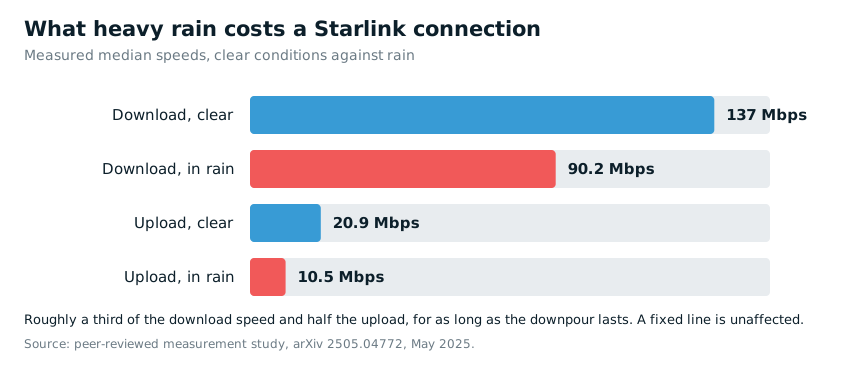
Rain is measurable, not catastrophic. A peer-reviewed measurement study recorded median download dropping from 137 Mbps to 90.2 Mbps in rain, with upload down from 20.9 to 10.5 Mbps. So a wet Sydney evening costs you about a third of your speed. A fixed line does not care about the weather at all.
Almost every complaint that Starlink is not reliable internet traces back to one of three things: a dish with a partly blocked view, a dish mounted where it flexes in the wind, or a router two brick walls away from where people actually use the internet. All three are installation problems, and all three are fixable.
What happens in a power cut

Both fail. This surprises people who assume satellite is somehow independent — the dish and router need mains power, and the dish alone draws 75 to 100 watts. The NBN is no better: nbn stopped supplying battery backup for fibre connections in 2024, so a modern fixed-line connection goes down with the lights as well.
The difference is what you can do about it. Starlink needs no street infrastructure, so if the dish and router have power, you are online even when the grid is not. Put them on circuits backed by a home battery and your internet survives the outage — which matters if you work from home, or if the outage is a storm and you want to keep watching the emergency updates.
One caveat we make on every quote: a battery keeps your equipment powered, but it cannot do anything about short interruptions in the Starlink service itself during severe weather.
Three things Starlink cannot do
A static IP address. Residential Starlink sits behind carrier-grade NAT. No static IP, no port forwarding, no hosting anything from home, and some VPN setups need work. On NBN a static IP costs around $5 a month.
Medical alarms and back-to-base security. This one is not a preference, it is a safety issue. nbn maintains a national medical alarm register and providers are required to work with it. Telstra’s Starlink-powered satellite voice service says it plainly in its own description of service: the service will not work in a power failure, including emergency calls, back-to-base alarms and medi-alert functions. If someone in the house depends on a monitored alarm, talk to the alarm provider before you change anything.
A guaranteed fix when it breaks. Starlink support is email and app based. NBN services go through a retail provider who can escalate a fault on your NBN connection and, for business plans, commit to a repair time. There is no technician dispatched to your street and no service-level commitment of the kind an NBN retailer gives a business customer.
Starlink or NBN: which is the better choice at your address?
The NBN is the better option if:
- your address has FTTP or HFC — this is most of Bankstown, Hurstville, Randwick, Maroubra, Menai, Peakhurst, Revesby, Sutherland and Miranda;
- you can order the free fibre upgrade, whatever your current technology;
- someone in the house uses a monitored medical alarm or a back-to-base security system;
- you play competitive games, or you need a static IP;
- you want the lowest monthly bill for the speed.
Choose Starlink if:
- you are on FTTN, the evening speeds are poor and the fibre upgrade is still years away;
- your property is outside the fixed-line footprint altogether;
- you need a working connection in days rather than weeks — new build, rental, business that has just moved in;
- you want Starlink as a backup connection for a business that cannot afford to be offline;
- you move between properties, or you want internet in a caravan or on a boat.
A practical middle path for the copper pocket. Compared to NBN, Starlink asks very little to try: no contract, and a full refund within 30 days. If you are on a bad FTTN line, run both home internet connections for a month and keep whichever one actually works at your address. That is the sort of test no article can do for you.
Frequently asked questions
Is Starlink worth it over NBN in Australia?
It depends on one thing: what the fixed line at your address can do. On fibre or cable, no — the NBN is faster, cheaper and lower latency. On a bad copper FTTN connection, or with no fixed line at all, yes. Check your address first at nbnco.com.au/check-address.
What is the downside to Starlink?
Higher latency than fibre, about a third of your speed lost in heavy rain, no static IP or port forwarding, no support for monitored medical and security alarms, and a dish that needs a genuinely clear view of the sky. None of that is a deal-breaker for an ordinary household; all of it matters to somebody.
Is Starlink fast enough for Netflix?
Comfortably. Netflix asks for 15 Mbps for 4K, and Starlink measured 199 Mbps in the ACCC’s busy-hour testing. A household can run several 4K streams at once.
Starlink or NBN: which is better for gaming?
Fixed-line NBN, on latency. Starlink’s 30–36 ms is fine for most games, but fibre’s 9–11 ms is measurably better for competitive play.
Does Starlink work in bad weather?
Yes, more slowly. Measured median download fell from 137 Mbps to 90.2 Mbps in rain. Severe storms can cause brief dropouts. Day-to-day Sydney weather is not a problem.
Is NBN fibre cheaper than Starlink?
Yes. An NBN 500 plan runs $93–$113 a month with no connection fee. Starlink’s 200 Mbps plan is $110 a month and the 100 Mbps plan is $75.
Can I get NBN fibre at my address, and is the upgrade free?
Check at nbnco.com.au/check-address and order through your provider. There is no build cost from nbn for eligible premises. On FTTN and FTTB you need to take a 500/50 plan or faster; on FTTC that requirement was removed on 1 July 2026.
Is switching to Starlink worth it if I already have an NBN plan?
Only if the NBN plan is the problem. On fibre or cable it is a downgrade. On a failing FTTN line with no upgrade date it is often the best internet available at that address today. Run both for a month before you cancel anything — Starlink refunds in full within 30 days.
What happens to my Starlink kit if I switch to the NBN later?
If your kit was supplied at no upfront cost, it is a loan and you return it when you cancel, or you are billed for it. A kit bought outright is yours: people keep them for a holiday house, a caravan or as a backup connection for a business.
What happens to Starlink in a blackout?
It stops, like every internet connection. The dish draws 75–100 watts, so a home battery or a decent UPS will keep it running through an outage. We wire routers and Starlink equipment onto backed-up circuits as part of a battery installation.
Can I use Starlink with a medical alarm or back-to-base security?
Not safely, without checking with the alarm provider first. Satellite voice services state clearly that they do not work in a power failure, including emergency calls and alarm functions. If a monitored alarm is in use, that is a reason to keep the fixed line.
Still have questions? We answer the ones we get asked most about solar, batteries and EV charging on our FAQ page, and the full scope, pricing and warranty for satellite work is set out on the Starlink installation page.
If Starlink is the right answer at your address
We install Starlink across southern and eastern Sydney, from Bankstown to Cronulla and Randwick — roof or pole mounting, the cable sealed where it enters the house, Wi-Fi set up and the connection tested before we leave. $349 fixed for a standard home, published on the page so you know the price before you call.
And if you tell us your address and it turns out you can order a free fibre upgrade, we will tell you that instead.
Prices and network data in this article were checked in September 2026. Independent installer — not affiliated with Starlink or SpaceX.